Pulling Encryption Keys Out of Passkeys with the WebAuthn PRF Extension
Table of Contents
Passkeys show up on login screens everywhere now. What’s less well known is that the same authenticator holding your passkey can also hand out key material for encryption, not just authentication. The prf extension in WebAuthn is that path. This post covers what PRF actually returns, how it relates to the CTAP2 hmac-secret extension, what you still have to build yourself before it’s usable for real encryption, and where device and platform support stand as of 2026.
WebAuthn and passkeys in short
WebAuthn creates public-key credentials scoped to a Relying Party, the service requesting the login. The authenticator, a device security module such as a secure enclave or TPM, holds the private key. The server stores only the public key and verifies a signature over a server-issued challenge plus client and authenticator data. The private key never leaves the authenticator.
A passkey is a WebAuthn/FIDO credential unlocked by a device’s screen lock, biometric sensor, PIN, or pattern. Biometric data itself stays on-device. Those two properties, RP-scoping and local verification, are what make passkeys more phishing-resistant than passwords.
What the PRF extension returns
The WebAuthn prf extension returns one or two pseudo-random outputs tied to a specific credential and to caller-supplied input values called salts. It’s defined in the W3C WebAuthn Level 3 specification, with background and use cases in the W3C PRF explainer.
The same credential and the same salt always produce the same output. Without the secret held by the authenticator, that output looks random. The practical mental model is HMAC with a random key and a strong hash function: different credentials or different salts produce unrelated outputs. Corbado describes this output as a deterministic 32-byte value bound to a specific passkey credential, usable as symmetric key material for WebCrypto once you add proper KDF and encryption design on top.
There’s an important boundary here. PRF does not encrypt anything by itself. It hands back credential-scoped key material after a WebAuthn ceremony completes. To turn that into actual encryption, the application still needs a separate crypto layer, typically WebCrypto.
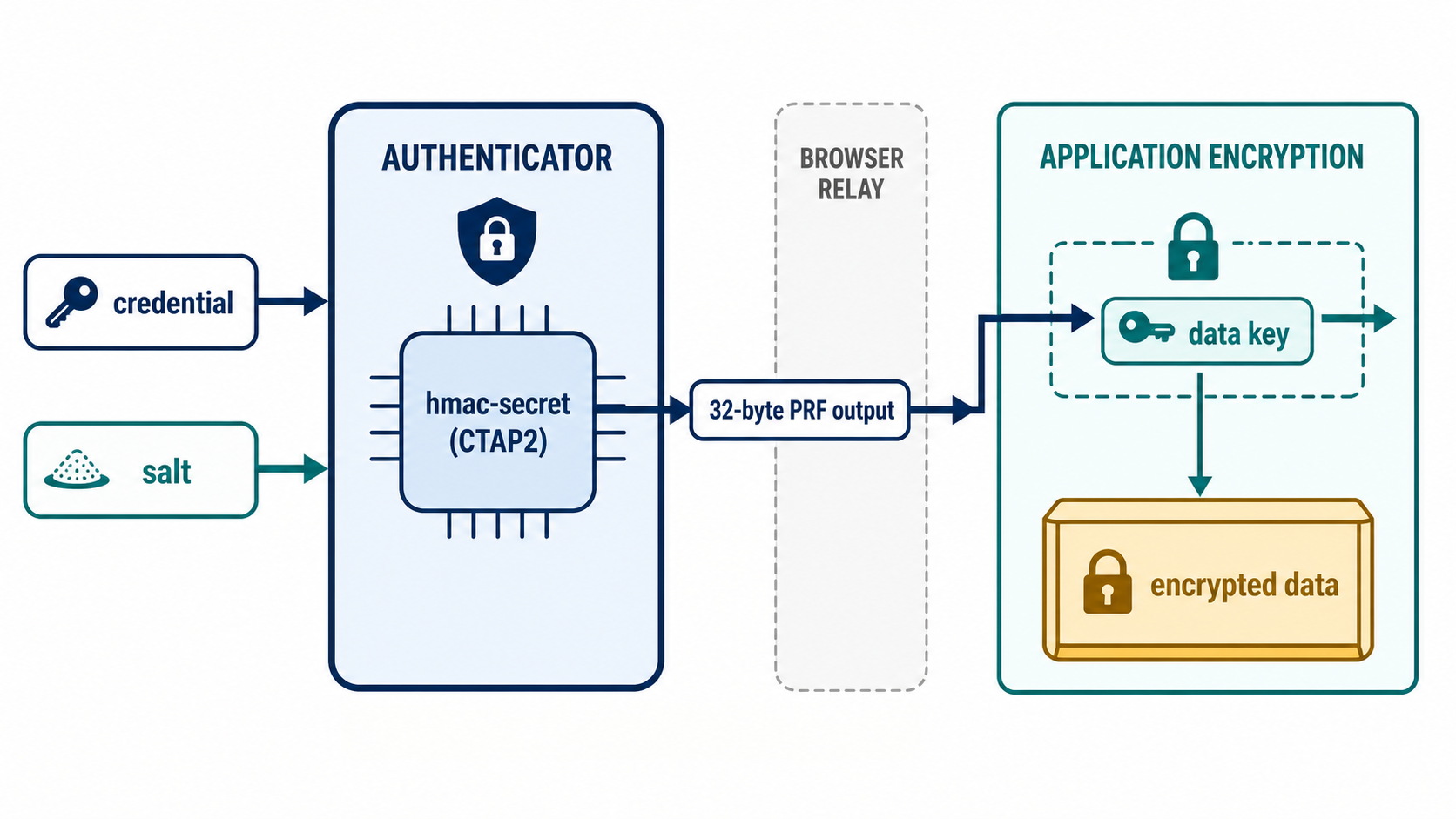
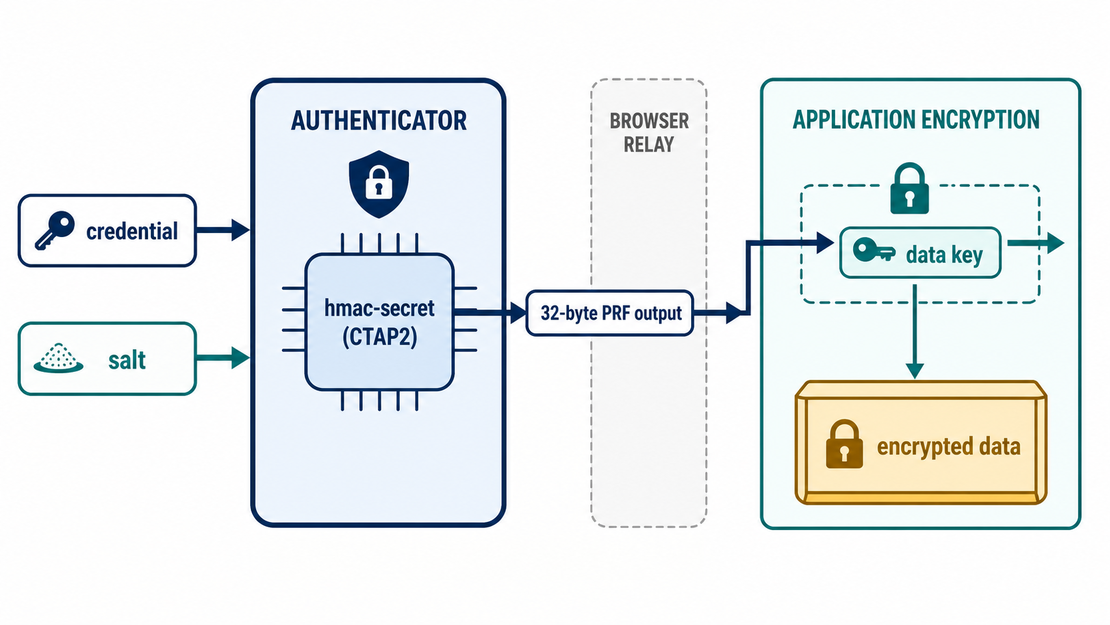
The authenticator owns the PRF computation, the browser only relays its result, and the application owns the actual encryption and envelope-encryption design.
How it relates to CTAP2 hmac-secret
The PRF extension sits on top of hmac-secret, an extension in CTAP2, the lower-level protocol between an authenticator and the browser or OS. Per MDN’s WebAuthn extensions documentation, PRF is the browser-level API surface for this hardware capability. An authenticator needs CTAP2 hmac-secret support before a browser can expose prf. The actual computation happens inside the authenticator; the browser is just the layer that passes the result to the application.
The browser doesn’t pass the app’s salt straight through to the authenticator. Per Corbado, it hashes the salt with the context string WebAuthn PRF plus a trailing null byte before handing it to CTAP2 hmac-secret. That keeps PRF inputs coming from the web separate from other uses of hmac-secret on the same authenticator.
Inputs and outputs: eval.first and eval.second
Per MDN, callers pass salts through eval.first (required) and an optional eval.second, and results come back as prf.results.first with an optional prf.results.second. Supporting two outputs in one call has a practical use: it lets an app request a “current key” and a “next key” in a single round trip, which fits key rotation patterns.
One caveat worth flagging: getting a PRF output at credential creation time (create()) is less widely supported than getting one at assertion time (get()). A create() call can report prf: { enabled: false }, meaning PRF is available on the authenticator but no output came back yet. An environment that doesn’t support PRF at all on get() can simply return an empty prf: {}. Application code needs to branch on both cases explicitly.
It’s also worth being direct about this: PRF evaluation goes through normal WebAuthn UI and authenticator activation. It is not something you can call silently in the background. Biometric confirmation or a PIN entry happens on each call, subject to whatever session policy the platform applies.
What has to line up for PRF to work
For a PRF result to reach the browser, three layers all have to cooperate. This is how Corbado frames it:
- The authenticator needs the CTAP2
hmac-secretcapability PRF depends on. - The OS needs to expose that capability to the browser.
- The browser needs to implement the WebAuthn
prfextension and return results correctly.
If any one of these is missing, prf.results comes back empty or the extension gets ignored outright. Because each layer ships and updates independently, the same authenticator can go from unsupported to supported purely from an OS or browser update.
What’s still your job in the encryption design
Using PRF output in a real system means your application, not the extension, owns at least three things:
- AES-GCM nonce uniqueness. If you use a PRF output as an AES-GCM key, you must prevent nonce or IV reuse under that key. Reusing a nonce with the same key breaks confidentiality, and PRF gives you no protection against that mistake.
- Envelope encryption for multiple credentials. Users often have more than one credential across devices. Rather than encrypting data directly with each credential’s PRF output, it’s generally easier to manage a single data encryption key, then wrap that key separately per credential.
- Account recovery. Lose the authenticator and the PRF-derived key material is gone with it. A recovery path, whether a backup credential or a server-side key escrow, needs to be designed up front. Neither WebAuthn nor PRF provides one.
How it compares to credBlob, largeBlob, and password-derived keys
If your goal is key derivation, it’s worth not confusing PRF with mechanisms that look similar on the surface.
- credBlob: a CTAP2 extension that stores a small, static blob alongside a credential. It’s built for storage, not secret derivation, so it isn’t a substitute for PRF.
- largeBlob: stores roughly 1KB with a discoverable credential, but it’s not a key derivation mechanism, and support is narrower than PRF’s.
- Password-derived keys: depend on something the user remembers. PRF depends on key material held by the authenticator plus a phishing-resistant WebAuthn ceremony, which is a fundamentally different trust model.
- WebAuthn signatures, authenticatorData, and the public key: none of these are valid secret material for deriving encryption keys. Data used for signature verification shouldn’t be reused as a cryptographic key.
Device and platform support
Support varies by OS, browser, credential provider, and authenticator. The table below summarizes the passkeys.dev device support matrix (last updated 2026-05-20). Before shipping, verify prf.enabled and prf.results directly in your target environments rather than relying on this snapshot.
| Feature | Supported on |
|---|---|
| Synced passkeys | Android v9+, ChromeOS v129+, iOS/iPadOS v16+, macOS v13+, Ubuntu (via browser extensions). Windows support is planned; device-bound passkeys are already supported |
| Autofill UI / Conditional Get | Android Chrome 108+ / Edge 122+, ChromeOS v129+, iOS/iPadOS 16.1+ (Safari, Chrome, Edge, Firefox), macOS Safari 16.1+ / Chrome 108+ / Firefox 122+ / Edge 122+, Ubuntu (browser extensions), Windows Chrome 108+ / Firefox 122+ / Edge 122+ (with a Windows 11 22H2+ footnote) |
| Passkey upgrades / Conditional Create | Android Chrome 142+, ChromeOS 136+, iOS 18+ (footnoted on browser/provider support), macOS Safari 18+ / Chrome 136+, Ubuntu Chrome 136+, Windows Chrome 136+ (requires OS and credential manager support) |
| Cross-device authentication client | Android v9+, ChromeOS v108+, iOS v16+, macOS v13+, Ubuntu Chrome/Edge, Windows 23H2+ |
| Third-party credential managers | Android v14+, iOS v17+, macOS v14+, Windows v25H2+, ChromeOS/Ubuntu via browser extensions |
Windows deserves its own note. Per Microsoft Learn (updated 2026-05-13), Windows Hello can create and store passkeys, unlocked by biometrics or PIN, and companion phone or tablet use is supported. Windows 11 version 22H2 with KB5030310 adds native passkey management, and Windows 11 24H2 prompts users for privacy consent before an app can access passkeys. Cross-device authentication requires Bluetooth enabled on both the Windows machine and the mobile device, plus an internet connection.
That table covers passkey support in general. PRF is a narrower slice within it. Here’s the 2026 PRF support snapshot from Corbado’s writeup (updated 2026-05-19).
Windows Hello historically didn’t support hmac-secret, so platform-authenticator PRF was off the table there. Per Corbado, Windows 11 25H2 build 26200.7840 or later, with the February 2026 cumulative update KB5077181 applied, started returning PRF values from Windows Hello. Microsoft’s WEBAUTHN_API_VERSION_8 exposes PRF evaluation during both credential creation and authentication. Firefox 148+ fully supports PRF with Windows Hello, and creation-time support was backported to Firefox 147 (per the Bugzilla item Corbado links to). Chrome 147 adds PRF-on-create support on Windows and enables it by default, while Chrome/Edge 146 are listed as authentication-only in Corbado’s table. Treat this as a snapshot of the ecosystem at the time Corbado wrote it, not a permanent state.
macOS 15+ supports PRF via the iCloud Keychain platform authenticator across Safari 18+, Chrome 132+, and Firefox 139. iOS/iPadOS 18+ also supports PRF via iCloud Keychain, though versions 18.0 through 18.3 had bugs in cross-device authentication sources that could cause data loss; Corbado marks 18.4+ as fixed. External security-key PRF isn’t implemented on iOS/iPadOS yet, per Corbado’s table. There are also reported WebKit bugs around Safari’s handling of CTAP2 security keys on macOS and iPadOS.
Android has the strongest broad support in Corbado’s assessment. Google Password Manager passkeys include PRF by default and work across Chrome, Edge, and Samsung Internet. Android Firefox is listed as unsupported.
Authenticators themselves fall into four rough buckets, per Corbado’s classification:
- No PRF support.
- PRF only if requested at credential creation, true of some CTAP 2.0/2.1 security keys.
- PRF available at authentication time even when it wasn’t requested at creation, as with newer security keys, iCloud Keychain, and Google Password Manager.
- Full CTAP 2.2-style support, where the first PRF value comes back immediately at creation, mostly seen with synced passkey providers.
One assumption to avoid: passkey support does not imply PRF support. PRF availability is a narrower subset, and it can vary by authenticator or credential provider even on the same OS. Production code needs to check prf.enabled and prf.results at runtime and have a fallback, such as server-managed keys, when PRF isn’t there.
For background on Apple’s model, see Apple’s official support document, which covers the passkey security model along with iCloud Keychain sync and device-bound options. Chrome’s implementation details are in Chrome for Developers’ WebAuthn documentation.
A production example and how to test it
Dashlane is a real-world example of shipping WebAuthn PRF. Per Corbado’s writeup, Dashlane uses WebAuthn PRF to derive vault decryption keys from passkey authentication alone, without a separate master password. Treat that as one adoption data point rather than a guarantee about implementation specifics beyond what the source states.
To check a specific target environment directly, the Corbado PRF Demo lets you test whether PRF actually works on a given OS, browser, and authenticator combination. Since the support picture above shifts over time, it’s worth building that kind of direct check into your pre-launch process instead of relying on any single snapshot.
Takeaways
The PRF extension turns a passkey into more than a login mechanism: it becomes a credential-scoped key derivation tool. But what PRF actually does stops at “return a stable pseudo-random output tied to a credential and a salt.” Real encryption (AES-GCM nonce management), multi-device support (envelope encryption), and recovery design are still on the application. And because support depends on the specific device, OS, browser, and credential provider combination, checking it directly in your target environments belongs on the pre-launch checklist.
References
- W3C Web Authentication Level 3, PRF Extension: W3C Candidate Recommendation Snapshot, 2026-05-26
- W3C WebAuthn PRF explainer: GitHub, w3c/webauthn
- MDN Web Authentication extensions: MDN, last modified 2025-06-23
- Google Passkeys overview: Google for Developers, last updated 2026-04-15
- passkeys.dev device support matrix: passkeys.dev, last updated 2026-05-20
- About the security of passkeys: Apple official support document
- Support for passkeys in Windows: Microsoft Learn, last updated 2026-05-13
- Enabling Strong Authentication with WebAuthn: Chrome for Developers
- Passkeys & WebAuthn PRF for End-to-End Encryption: Corbado, Vincent Delitz, last updated 2026-05-19
- Corbado PRF Demo: Corbado, tests PRF behavior across OS/browser/authenticator combinations